
|
Perle Systems Technical Note
Out-of-Band Management of Windows Server 2003/2008 using Perle’s Simple EMS/SAC Web Interface
The Emergency Management Services (EMS), available in
Windows Server 2003 and Windows Server 2008, provides
“headless” support for today enterprise servers. It enables
management services without the need for a keyboard,
mouse, local monitor, and video adapter. A server administrator
interacts with EMS through a Special Administration Console
(SAC) to perform management and recovery tasks, even
when the system’s operational status is questionable.
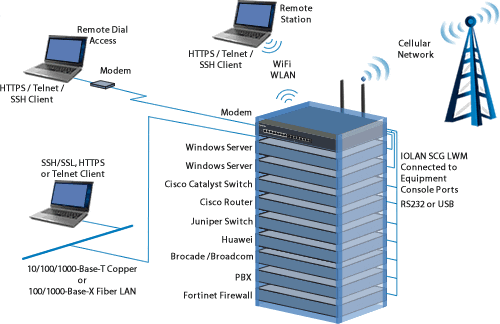
In this scenario, a Windows server can be managed through
the server’s console port using a text-based command-line
interface. Microsoft recommends using a "terminal
server" or "console server" to connect
multiple servers to a single point of contact for remote
management. The benefits include:
- managing the servers without having to be physically
located at the serial port,
- more than one administrator can access the servers,
and
- multiple servers can be monitored from one location.
This “Out-of- Band” operation provides the best method
for recovery of Windows Servers in remote locations today.

As stated by Microsoft some scenarios where access to
SAC is the best way to recovery are;
- The server is not functioning properly due to a Stop
message event.
- The server is very low on resources,
which causes the network driver to be exceptionally slow
or unable to respond to requests.
- The network stack
is malfunctioning or has failed.
- A Windows Server 2003
component is running that does not support in-band communication,
such as the loader or the Recovery Console.
- The server
is not yet fully initialized.
Example for Setting Up a Windows Server 2003 Port for
SAC
- A Windows Server 2003
component is running that does not support in-band communication,
such as the loader or the Recovery Console.
- The server
is not yet fully initialized.
bootcfg /ems ON /port COM1 /baud 9600 /id 1
In this example we are specifying COM1 as the port to
redirect console SAC traffic to. Please refer to Microsoft’s
documentation for specific information on the SAC feature.
Simple SAC Web Interface
Using Microsoft’s EMS - SAC tool can be a daunting task
for some Windows administrators who are more comfortable
with a graphical interface.

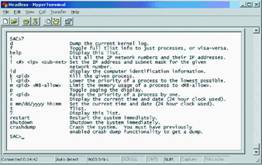
Windows EMS – SAC’s text-based command line interface
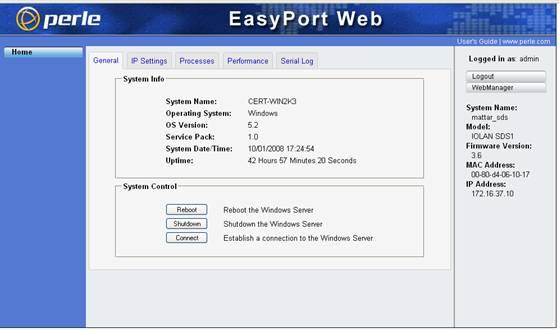
Perle has addressed this issue on its IOLAN Terminal
Servers by providing a simple browser-based graphical
user interface tool that speeds up system recovery time
specifically for Windows Servers administrators. All of
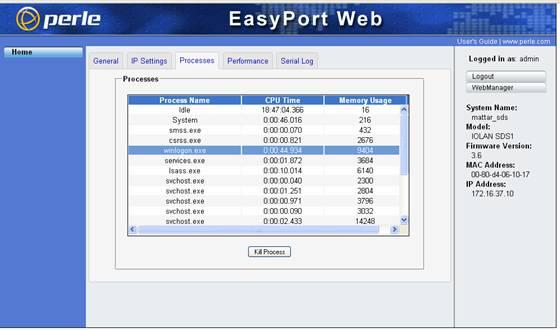
the EMS/SAC functions are available to the user such as;
- Reboot
- Shutdown
- Set/Change
IP address
- View and kill processes
- View
system uptime and date
- View
system performance
- View log
of messages from the SAC serial
port


IOLAN Console / Terminal Servers
Perle offers a complete line of products that consolidate
serial console access using strong security and data
encryption and providing fault-tolerant models with
dual Ethernet and dual power supplies for ultimate reliability.
Serial port densities from four to 48 ports are available
giving customers the ability to connect all of their
Windows, Linux, Solaris and Unix servers, network and
infrastructure equipment by using the same console management
system.
Customers who want a single solution for all of their
Windows and non-Windows network and telecom equipment
can upgrade their Windows servers to take advantage of
the EMS features. Using a Perle Console
Server, they
can reduce equipment and operating costs, minimize network
downtime, and add secure remote access to all systems
for remote console management.
|