Perle Serial to Ethernet Terminal Servers
Specialix Chase Research
Applications > Healthcare and Medical > Serial to Ethernet for HIPAA Compliance

Perle Systems Application Note

Advancing HIPAA Compliance with Network Management

A Perle Systems Discussion Paper For Heath Care System Administrators

Get a Quote
Product Question?

HIPAA Initiatives

Congress passed the Health Insurance Portability & Accountability Act (HIPAA) in 1996. Deadlines for adherence to these guidelines has either already passed, or, for smaller health care institutions, will be approaching soon. It represents the most comprehensive piece of legislation ever passed to reform health care transaction and administrative information systems, limit fraud and abuse, and protect confidential patient information.The importance of HIPAA is evident in the fact that compliance is not an option--it is a mandatory requirement for every organization involved with electronic health care information.

Section 1173(d) of the Act states: Each person described in section 1172(a) who maintains or transmits health information shall maintain reasonable and appropriate administrative, physical and technical safeguards to ensure the integrity and confidentiality of the information and to protect against any reasonably anticipated threats or hazards to the security or integrity of the information and unauthorized use or disclosure of the information.

The Importance of Secure and Reliable Network Management

Health care providers that store patient data electronically or transmit health care information electronically are under pressure from the Department of Health and Human Services (D.H.H.S) to comply with all HIPAA standards. These regulations have a number of implementing effects that set a new standard for the health care provider, specifically in regard to the security of digital networks that are increasingly used to transmit patient data. More and more of the medical worlds business rely on digital communication systems.Those networks contain the stored information available for transmissions that are open to security weaknesses. Past practices in managing network infrastructure are no longer acceptable. Security of the healthcare networks used to transmit and access the medical data is increasingly important and needs a secure and reliable network management technology.

Healthcare networks may have few or many, devices and applications that need to be installed, configured and managed.The Gartner Group estimates that more than 70 percent of network costs are spent in network administration, support and training. Under the new healthcare initiatives healthcare providers would find it impossible to work without constant access to their network computers or enterprise-wide systems.The ability to monitor and manage these networks and keep them up and running is pivotal to meeting HIPAA compliance for the transfer of information among health plans.

The responsibility to ensure that healthcare providers have faultless access to their systems is continuously placed on system administrators. Not only must these system administrators ensure that servers supplying mission critical applications are functioning, it is also their responsibility to ensure that the entire network connecting the data to a multitude of widely dispersed remote users remains functional.When networks crash, productivity does too and the longer a network is down, the greater the impact on the healthcare providers patients.

The stakes are high to maintain both availability and performance of the healthcare providers network, regardless of how widely dispersed the network infrastructure is. Generally, it is becoming harder to find technical expertise with the necessary skills and resources to administer such systems.The issue becomes how to expand the capabilities of network management personnel within the healthcare provider to better maintain the variety of network infrastructures presently being deployed, and to minimize and possibly avoid network downtime and performance loss.

In the Quest of a Management Connectivity Solution

There are multiple methods of connecting to a healthcare network infrastructure, in order to perform system management tasks.The most common of these techniques is to manage the system via the network itself. However, managing from the network can have its drawbacks. For example, what happens when, due to system failure or network failure, the system is suddenly not visible via the network?

Most computer systems and network devices provide a serial port for such management and maintenance purposes.The functions that can be performed via these ports vary from one manufacturer’s product to another and can also be influenced by which operating system is used. If we refer to a single system, the administrator may have a monitor and keyboard directly and permanently connected to it, or will connect with a laptop. But what happens if there are many systems and devices to manage?

Connecting a dumb terminal or a monitor-keyboard combination to every system would require space, hardware, cabling and power supplies for each one. In addition, the heat generated by all of the screens would require additional air conditioning to maintain a safe room temperature for the computer hardware to function properly.

Even with a laptop, it’s time-consuming for an administrator to connect, perform service, disconnect and move on to the next server, leaving the staff unavailable for other activities.

The Evolution in Managing Network Infrastructure

One of the early network management connectivity tools used to help system administrators maintain both availability and performance of the healthcare network was the Terminal Server. By reversing the role of the traditional Terminal Server application of connecting terminals to host systems, the Terminal Server could act as a serial port switch to connect one console terminal to many hosts. It could also be accessed from any telnet client anywhere on the LAN for day-to-day maintenance tasks. By using Telnet on their administration PC, they could access the Terminal Server and subsequently the attached devices or the host.

This management connectivity solution immediately eliminated the need for separate screens for every device and allowed the administrator to connect from a fixed location. In the case of a WAN, the administrator could even connect to remote sites. However, management connectivity through the use of Terminal Servers could be costly over time, since they were not specifically designed for remote management functions and required a fair amount of set up before they could be deployed.Terminal Servers also present a problem to the large community of users that use Sun Systems for their computing needs as they can cause systems to shutdown unexpectedly.

Catering for Sun

A Sun™ Solaris™ operating environment has a unique feature on the serial management port. If a Sun system is powered up without a monitor or keyboard connected, the serial port is automatically configured as a console management port. The entire Sun system can be managed from this port.

When the need arises the administrator has the ability to shut the system down to the “Open Boot Prompt” (OBP). The shut down takes the systems down to an engineering level and shuts all other services down. This happens when a ‘break’ signal is sent to the port, which the Sun system reads as the command to shut down. Most serial systems such as Terminal Servers (and even serial cards) send a ‘break’ signal when they are powered on and off. This does not pose a problem in an environment where the Terminal Server is deployed to function only as a Terminal Server. However, it is fatal when connected to a Sun system as a management connectivity solution.

When a Terminal Server is powered off it sends a ‘break’ signal from all ports. This signal will automatically shut down all attached Sun servers. The result is disastrous to any government agency whose mission critical applications are running on those servers. When networks crash, productivity does too, and the longer a network is down, the greater the impact on the healthcare provider.

Sun has tried to combat the “break” signal problem for organizations deploying Terminal Servers as their primary management connectivity solution by providing configuration patches for their Sun Solaris systems. Although these Sun patches do minimize the event of a total network crash from “break” signals, they add additional administration problems for system administrators. In addition, this solution blocks the sending of the ‘break’ signal manually, which an administrator may wish to do, in the event of a hung system, or for other maintenance purposes.

Now Enters the Console Server Solution

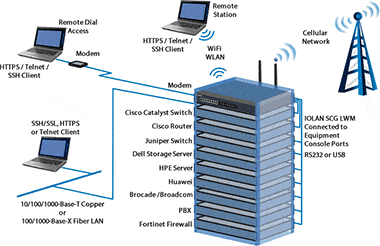
A solution for remote system management is to deploy a multi-port Console Server to provide network access to local system consoles. As such, Console Servers provide access to all of an organization’s network infrastructure devices that are managed via a console port over a networked connection. With a Console Server, administrators have access to a system’s console from anywhere on the local network, or via dialup connections, as if they were locally connected through a direct serial connection.

Although Console Servers perform similar functions to Terminal Servers as a system management tool, they offer several differences to system administrators.

1) Flexible Access

The main difference between console and Terminal Servers is that Console Servers are designed specifically to be deployed as a system management solution.

  • Replace multiple dumb screens with a single PC and a Console Server
  • Manage multiple simultaneous console windows with one LAN workstation

2) Reduces Costs

Console Servers provide a solution that helps to maximize system administrators’ productivity. Generally, a single interface provides them with multiple connectivity to appliances and system consoles from any location and is easier to install and set up, saving administrators’ valuable time and costs.

  • Support multiple systems over a single Out-of-Band connection
  • Minimize expensive training, HR and travel costs
  • Eliminate IT redundancy in the business process
  • Streamline office automation and infrastructure

3) Network Security

Console Servers generally offer higher level of security features to provide secure access to critical network devices.

  • Security options include built-in user names and passwords and support for encryption protocols such as SSH
  • Support SLIP and PPP for remote user dial-in
  • RADIUS for server environments
  • Packet filtering to ensure the Console Server can be kept secure from unauthorized access

4) “No Break” feature

Some Console Servers currently on the market address the Sun Solaris ‘break’ issue making them safe and ideal for use in a Sun environment.

  • Generates significant saving of administrator’s time
  • Reduces costly Sun server reboots
  • Keep system disruptions to a minimum

5) Port Buffering

Most Console Servers offer Port Buffers of varying sizes to ensure data from attached devices is not lost.Without Port Buffers any data sent from a device while an administrator is not attached is lost.With port buffers this data is captured and can be viewed later to aid in problem diagnosis.

  • Ensures all data is captured
  • Eases an administrators burden when there is a problem

The Present and Future

As healthcare providers needs to branch out over wide area networks increases, the Console Server and remote access servers have become a staple among network devices – guaranteeing a system administrator the means to manage network devices regardless of proximity to that device.

In the event of a total network failure, remote access is pivotal. Prior to remote access, the alternative was for systems administrators to physically travel to the location of the failing device, gain access to the console port and ascertain the nature of the failure. Remote access now gives the administrators the freedom to travel anywhere, virtually secure with the knowledge that in an emergency they can still connect into their vital systems.

All healthcare facilities have until April 2004 to conform to the HIPAA regulations. These regulations also state that no freestanding modems are allowed at health care facilities due to security. So, all network contact must be done through a secure modem pool (RAS) or the Internet via VPN or FTP.

The Alternatives

Of course, system administrators are not limited to the use of Terminal Servers or Console Servers as system management tools. It is possible to have an individual costly monitor and keyboard for every system but this solution takes up valuable space and creates unnecessary heat within the system rooms.

KVM (Keyboard,Video, Mouse) systems allow a number of systems to be connected to a single display and keyboard.The cost of deploying this solution can be particularly high, if the system administrator is connecting Unix workstations such as Sun or SGI.The option of a KVM solution is generally limited by distance due to signal strength limitations. An added consideration to deploying such a solution is that most KVM switches are large and utilize much rack space, and some are unable to handle more than 8-12 device connections. Although they can be cascaded, this is not typically a viable solution for large data centers. Some newer KVM switches have resolved a number of the above issues, however if a Microsoft server crashes and/or the GUI locks up, access to the attached server can never be obtained via the KVM switch.The server must be physically rebooted.

A Viable Total Management Solution

As organizations continue to expand networks, the need for management of those networks will become increasingly important to the success of those organizations. By using Console Servers to manage their critical systems and device consoles, system administrators can deploy a simple and flexible solution to address multiple management problems.

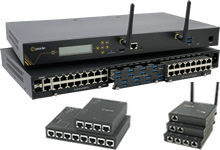
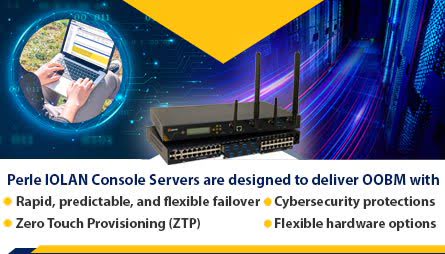
The Perle Console Server allows system administrators to securely and efficiently run network console ports and server farms remotely. This cost effective network management tool delivers serial device access from any location using In-Band or Out-of-Band via a corporate LAN/WAN or dial in connection. In addition to the largest port buffers in the industry, Perle is the only Console Server on the market to offer secure, encrypted remote data storage to ensure vital data from attached devices is not lost.

For system administrators in a Sun Sparc Server networking environment, the Perle Console Server offers a “No Break” key feature. This “No Break” feature assures that the Perle Console Server will not send a break signal when power cycled. This feature prevents costly Sun Server reboots and network shut downs

Available in 1, 2, 4, 8, 16, 24, 32 or 48 RS232 ports, 10/100/1000 Mbps Ethernet, 1U high rackmount units with up to a 230Kbps throughout per port, the Perle Console Server offers system administrators additional benefits:

1) Flexibility of Multiple Connections

  • Enable desk-based network administration
  • Provide direct device interface via In-band Telnet or SSH connections
  • Multi-session capability secures access rights for multiple simultaneous port users

2) High Security features

  • SSH to allow secure encrypted connections
  • Authentication done internally and/or via an external Radius server
  • Packet filtering to ensure only authorized systems gain access
  • Ability to disable unused daemons to increase security against hackers
  • 3DES Encrypted Remote Data storage allows administrators to view an unlimited amount of data captured through port buffers

3) Making System Administrator’s Job Easier

  • Replace multiple dumb screens with a single PC and a Console Server
  • Avoid proprietary software by using simple Telnet connections
  • Manage multiple simultaneous console windows with one LAN workstation
  • Optional cables for systems such as Sun and Cisco to allow a quick and easy

4) Keeping Costs Down

  • Simple to install – once it is given an IP address it is ready to run
  • Support multiple systems over a single Out-of-Band connection
  • Reduce HR and travel costs

5) “No Break” Feature for Sun Platforms

  • Generates significant saving of administrator’s time
  • Reduces costly Sun server reboots
  • Keep system disruptions to a minimum

6) Peace of Mind

  • Approved ‘Solaris Ready’
  • Perle’s Lifetime Warranty for security in mission critical applications
  • Perle’s support and maintenance options are unrivaled

7) Essential Network Connectivity

  • Sun Sparcs
  • Linux boxes
  • Headless rack servers such as Sun Netra T1
  • System diagnostic cards such as Compaq’s IRC or Dell’s DRAC
  • Routers
  • Remote Access Servers
  • Switches
  • Firewalls
  • PBX’s
  • Non-network devices such as CSU/DSUs, diagnostic and test equipment
  • All other premises equipment that would normally be accessed via a modem or serial port such as security consoles,HVAC’s and even closed circuit cameras.

Glossary of Terms

  • In Band Management – the ability to administer systems via the LAN
  • Out of Band Management – administering networked systems without using the corporate LAN
  • Headless Servers - have no monitor, keyboard or mouse ports. Access is only available via network and serial management ports.Typically 1U high.
  • SSH – Secure Shell (or Secure Socket Shell), an encrypted method of connection to replace Rlogin or Telnet
  • Terminal Server – product primarily for connecting terminals, printers, data collectors to server (i.e. Perle IOLAN+)
  • Break – A space (or spacing) condition that exists longer than one character time (typical length is 110 milliseconds)

Sun, Sun Microsystems, the Sun logo, Solaris, and The Network Is The Computer are trademarks or registered trademarks of Sun Microsystems, Inc. in the United States and other countries.

» Back to top


Terminal Servers | Console Server | Device Server | Ethernet IO Device Server | Serial Card | About Serial to Ethernet Solutions | Ethernet Media Converters | About Ethernet to Fiber Solutions
Site Map | Legal Information | Privacy Policy | Contact Us
Copyright © 2012 Perle. All Rights Reserved

[ International Sites ]