Modern networks demand more than device connectivity. They require centralized visibility, simplified management, and secure access to critical infrastructure distributed across data centers, branch offices, industrial facilities, utility sites, transportation networks, and remote locations.
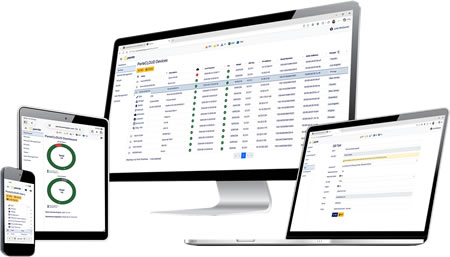
PerleCLOUD delivers a unified, cloud-based platform that lets organizations deploy, monitor, manage, and access Perle IOLAN SCR Console Servers and the equipment connected to them from anywhere. Whether you're supporting hundreds of network devices or thousands of geographically dispersed assets, PerleCLOUD simplifies operations while helping improve uptime, security, and responsiveness. Manage your infrastructure from a single pane of glass.
One Platform. Complete Infrastructure Visibility.
PerleCLOUD provides centralized management for your Perle IOLAN SCR deployment, giving operations teams a secure and efficient way to monitor remote infrastructure, manage configurations, and access critical devices when issues occur.
From daily administration to emergency troubleshooting, PerleCLOUD helps IT and OT teams maintain control over distributed environments without costly site visits.
Manage More Than Just Console Servers
Many management platforms stop at managing the console server itself. PerleCLOUD extends visibility to the infrastructure behind the console server, allowing administrators to access and manage critical equipment through multiple management interfaces securely.
- Serial Console Management: Securely access routers, switches, firewalls, servers, power systems, and other devices through RS232 RJ45 console ports.
- USB Console Management: Manage infrastructure equipped with USB console interfaces through centralized cloud access.
- Ethernet Console Management: Access and manage equipment that provides dedicated Ethernet console management interfaces, helping teams maintain visibility across modern network environments.
By supporting serial, USB, and Ethernet console management ports, PerleCLOUD gives organizations the flexibility to manage all devices used in modern infrastructure environments.
Bring Remote Cellular Sites Online Faster
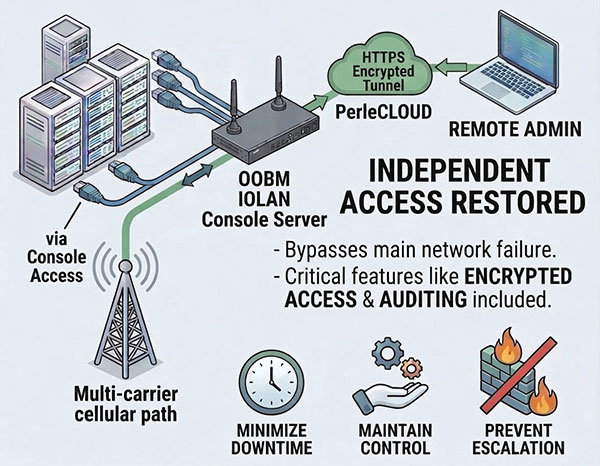
Remote infrastructure projects often rely on cellular connectivity to deliver immediate access and operational visibility. PerleCLOUD simplifies the deployment of remotely located IOLAN SCR Console Servers connected over cellular networks. Because the management platform exists as a cloud service, organizations can bring new sites online without setting up or maintaining a management server. This cuts deployment complexity and gives operations teams immediate visibility for:
- Faster onboarding of remote locations
- Reduced deployment complexity
- No management server installation required
- Simplified scalability across distributed networks
- Lower administrative overhead
- Faster access to operational visibility
For organizations deploying infrastructure across utilities, transportation systems, telecommunications networks, industrial facilities, and other remote environments, PerleCLOUD helps accelerate the path from installation to active cellular management.
Rapid Incident Response
When equipment fails or connectivity is disrupted, response time matters. PerleCLOUD helps operations teams quickly identify issues, securely connect to affected devices, and begin troubleshooting immediately.
Reduce Mean Time to Resolution (MTTR)
- View device health and connectivity status
- Receive notifications when devices become unreachable
- Access remote consoles without dispatching technicians
- Investigate outages from any location
- Accelerate recovery from network failures
With direct visibility into distributed infrastructure, teams can resolve issues faster and reduce operational risk.
Streamlined Deployment and Administration
Manually managing hundreds of remote devices consumes valuable resources. PerleCLOUD simplifies large-scale deployments through centralized administration tools designed for enterprise environments.
Simplify Ongoing Operations
- Centralized inventory management
- Device grouping and organization
- Remote provisioning
- Firmware management
- Configuration backup and restoration
Designed for Secure Infrastructure Management
Infrastructure management platforms must protect critical systems while enabling authorized access. PerleCLOUD incorporates security-focused design principles to help organizations manage remote infrastructure confidently.
Security Features
- Encrypted communications
- Secure user authentication
- Role-based access control
- Centralized audit visibility
- Secure cloud-hosted architecture
- Controlled remote access to managed devices
Organizations can maintain operational visibility while supporting security and compliance objectives.
Built for Distributed Networks
PerleCLOUD is ideal for organizations operating infrastructure across multiple locations.
- Data Centers: Manage servers, network switches, routers, and power infrastructure remotely.
- Industrial Automation: Monitor and troubleshoot industrial networking equipment at production facilities and remote sites.
- Utilities: Maintain visibility into substations, field cabinets, and critical operational infrastructure.
- Telecommunications: Provide centralized access to communications equipment deployed across large geographic regions.
- Transportation: Support connected infrastructure in transit systems, traffic control environments, and remote transportation facilities.
- Financial Services: Maintain secure access to critical networking and computing infrastructure across branches and data centers.
Why PerleCLOUD?
PerleCLOUD was built to help organizations gain greater control of distributed infrastructure through centralized management and secure remote access. Advantages include:
- Centralized management of IOLAN SCR Console Servers
- Cloud-based deployment
- Real-time monitoring and alerting
- Secure remote console access over RS232 RJ45, USB, or Ethernet
- Scalable enterprise management
- Reduced operational costs through fewer site visits
- Faster incident response and troubleshooting
How PerleCLOUD Works
- Deploy IOLAN SCR Console Servers at remote locations.
- Activate cellular connection (if applicable).
- Register with PerleCLOUD.
- Connect infrastructure devices through serial, USB, or Ethernet management interfaces.
- Monitor, manage, and access infrastructure securely from anywhere through a centralized cloud interface.
Frequently Asked Questions
What is PerleCLOUD?
PerleCLOUD is a cloud-based management platform that enables organizations to centrally manage, monitor, and access Perle IOLAN SCR Console Servers and connected infrastructure.
Which products are supported?
PerleCLOUD supports Perle IOLAN SCR Console Servers.
Can I remotely access connected equipment?
Yes. Administrators can securely access devices connected through console management interfaces.
What connection types are supported?
PerleCLOUD supports infrastructure connected through RS232 RJ45, USB, and Ethernet console management ports.
Is PerleCLOUD suitable for large-scale deployments?
Yes. PerleCLOUD helps organizations manage distributed infrastructure across multiple sites from a central platform.
Is there on-premises management software required?
PerleCLOUD is a cloud-hosted platform that eliminates the need to deploy and maintain a dedicated management server. If you want an on-premises solution, check out PerleVIEW.